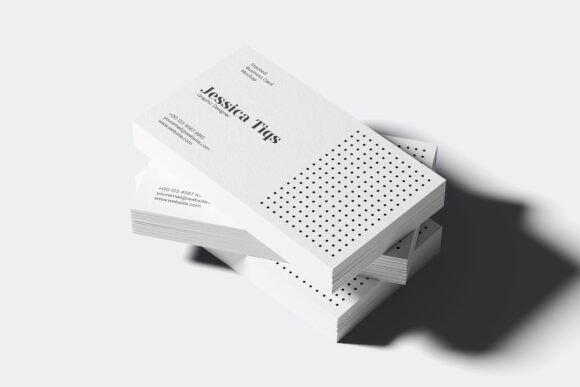
Stacked Business Card Mockup V2: A Practical Evaluation for Designers
In the competitive landscape of graphic design, the presentation of a final deliverable is often as critical as the design itself. When clients or stakeholders are asked to evaluate a business card concept, flat digital files can sometimes fail to convey the intended tactile quality, weight, and visual impact. This disconnect between the digital file and the perceived physical product creates a barrier to approval. To bridge this gap, designers rely on high-fidelity mockups that simulate real-world conditions. Among the various tools available, the Stacked Business Card Mockup V2 has emerged as a specific solution for professionals seeking to present their work with clarity and realism.
This evaluation explores the utility, features, and strategic advantages of using Stacked Business Card Mockup V2 for ID card and business card design projects. By analyzing its technical specifications and workflow integration, designers can determine whether this tool aligns with their professional standards and client communication goals.
Understanding the Tool: What Is Stacked Business Card Mockup V2?
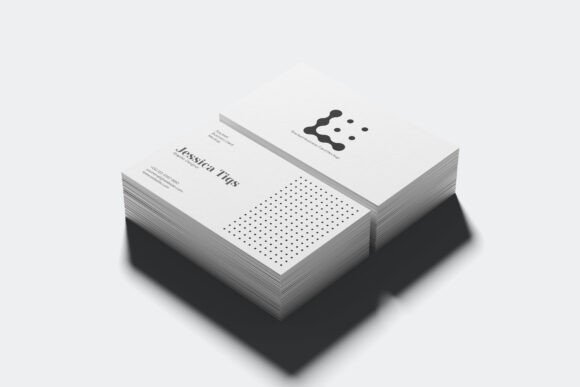
At its core, Stacked Business Card Mockup V2 is a digital template designed to visualize neatly stacked business cards. Unlike single-card presentations that isolate a design, this mockup emphasizes volume and texture, suggesting a tangible stack of printed materials. The primary function of this tool is to allow designers to insert their artwork into a pre-built environment, resulting in an image that looks like a photograph rather than a digital composite.
The mockup supports standard business card dimensions, specifically an image size of 89mm x 51mm. This ensures that the proportions remain accurate to industry standards, preventing distortion that might mislead a client about the final print size. For designers working on identity systems, corporate branding, or personal portfolios, this level of accuracy is essential for maintaining credibility.
Key Features and Technical Capabilities
The effectiveness of any design asset depends heavily on its ease of use and the quality of its output. Stacked Business Card Mockup V2 offers several technical features that streamline the design process:
- High Resolution Output: The mockup is provided in high resolution, ensuring that when the final presentation image is exported, it remains crisp and clear even when viewed at larger sizes or printed for portfolio books. Blurry textures or pixelated edges can undermine the perceived quality of a design; high-resolution assets prevent this common pitfall.
- Smart Object Replacement: One of the most significant time-savers in modern design workflows is the use of Smart Objects (particularly in Adobe Photoshop). This feature allows designers to double-click a layer, paste their own design, and save, automatically updating the mockup. This eliminates the need for manual warping, perspective matching, or complex masking techniques.
- Organized Layer Structure: The file structure is described as being well-organized into folders. In complex PSD files, layers can quickly become chaotic, making it difficult to locate specific elements for editing. A logical hierarchy reduces cognitive load and speeds up the revision process, especially when multiple variations of a design need to be presented.
- Customizable Colors: The mockup includes editable properties for both the object color (the cards themselves) and the background color. This flexibility allows designers to match the mockup to specific brand palettes or to create contrasting presentations that highlight the design’s typography and layout.
- Transparent Background Option: The inclusion of a transparent background capability provides additional versatility. Designers can overlay the stacked cards onto different environments or integrate them into larger compositional layouts without needing to manually remove the original background.
Strategic Benefits for Designers
Why should a designer invest time in creating a stacked presentation rather than simply emailing the PDF? The answer lies in psychological perception and client confidence.
Enhanced Realism: A stack of cards implies abundance and professionalism. It suggests that the design is not just a concept but a ready-to-print product. This visualization helps clients move beyond abstract criticism of fonts or colors and instead engage with the design as a physical object they can hold.
Efficiency in Revisions: With Smart Object functionality, changing from one design variation to another takes seconds. If a client requests three different color schemes, the designer can generate three distinct mockups without rebuilding the scene each time. This efficiency translates directly to billable hours saved and faster turnaround times.
Portfolio Polish: For freelancers and agency designers, the aesthetic quality of portfolio pieces matters. A clean, well-lit mockup of stacked cards demonstrates attention to detail. It signals that the designer cares about how their work is perceived, which can influence hiring decisions or contract negotiations.
Considerations and Tradeoffs
While Stacked Business Card Mockup V2 offers significant advantages, it is important to approach its usage with realistic expectations.
Learning Curve for Beginners: Although Smart Objects simplify the insertion process, users must still understand basic layer management in their chosen software. Users unfamiliar with organizing layers or navigating folder structures may find the initial setup slightly confusing, though the organized nature of the file mitigates this risk.
Limited Scene Variety: This specific mockup focuses on a "stacked" presentation. While effective for showing volume, it may not suit every project context. For example, if a client wants to see how a card looks folded, embossed, or placed in a wallet, this particular mockup will not fulfill those needs. Designers should maintain a library of diverse mockups to cover various use cases.
Preview Limitations: It is crucial to note that preview designs are not included. This means the user receives a blank canvas within the mockup structure. Designers must have their own artwork prepared before attempting to use the file. There is no pre-loaded sample design to study the lighting or shadow effects; these must be inferred by experimenting with the empty layers.
When to Use Stacked Business Card Mockup V2
This tool is particularly well-suited for:
- Corporate Identity Presentations: When presenting a full brand kit, showing multiple cards stacked together reinforces the consistency and robustness of the identity system.
- Freelance Client Deliverables: For independent designers, sending a polished mockup image alongside the source files adds perceived value to the service, justifying the fee.
- Social Media Content: High-quality mockups perform better on platforms like Instagram or LinkedIn. A visually appealing stack of cards attracts more engagement than a simple flat scan.
Alternatives to Consider
If Stacked Business Card Mockup V2 does not meet specific needs, designers might consider alternatives based on their goals:
- Single Card Mockups: If the focus is on intricate details like foil stamping or spot UV, a single card mockup with extreme close-up angles may provide better visibility than a stacked view where details are obscured.
- 3D Rendered Scenes: For ultra-realistic lighting and complex environmental interactions, AI-generated 3D renders or advanced Blender scenes offer unparalleled realism, though they require significantly more technical skill and time.
- Flat Lay Collections: If the goal is to show variety, a flat lay of many different cards spread out may be more appropriate than a neat stack, which implies uniformity.
Conclusion
Stacked Business Card Mockup V2 serves as a practical, efficient tool for designers aiming to elevate their presentation game. Its combination of high resolution, smart object ease-of-use, and customizable color options makes it a strong candidate for routine business card projects. While it is not a universal solution for every design scenario—such as those requiring detailed texture close-ups or complex environmental contexts—it excels in providing a clean, professional, and realistic visualization of stacked cards.
For designers evaluating their toolkit, this mockup represents a low-friction, high-reward addition. It addresses the common challenge of translating digital designs into perceived physical reality, helping to secure client approval and enhance portfolio aesthetics. By understanding its capabilities and limitations, designers can make informed decisions about when and how to deploy this resource effectively.